What it is
EdgeDeck is a full-screen FPV telemetry dashboard and session logger for a RadioMaster TX16S-style 480x272 color screen. It puts the checks I care about before launch, between packs, after landing, and during recovery into one radio screen instead of scattering them through EdgeTX telemetry pages.
During FPV flight the pilot is usually in goggles, so EdgeDeck does not assume the radio screen is the primary in-air interface. The screen stays useful for quick glances and review, while haptic, sound, and optional voice alerts handle the values that need attention while flying.
Why it exists
FPV telemetry is only useful if it answers practical questions quickly:
- Is the pack healthy enough to fly?
- Is the link solid?
- Did GPS come in?
- What happened on the last pack?
- How did this spot behave for range, signal, battery sag, and current draw?
EdgeDeck groups those answers into five radio-friendly tabs and saves per-pack history so the radio becomes useful before and after the flight, not just while the craft is armed.
Core screens
| Screen | What it is for |
|---|---|
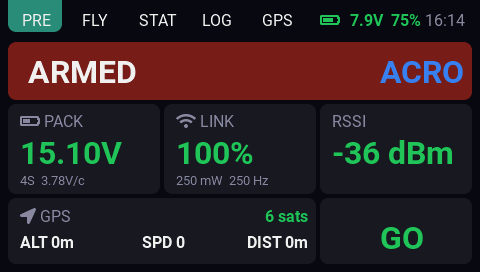
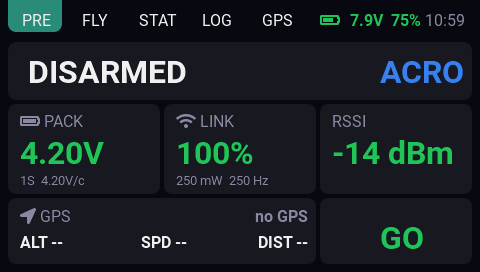
| PRE | Readiness check with arm state, mode, pack voltage, link health, RSSI, GPS status, and GO/CHECK state. |
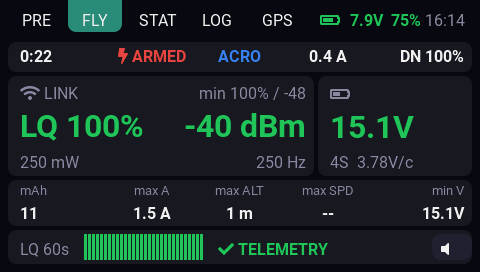
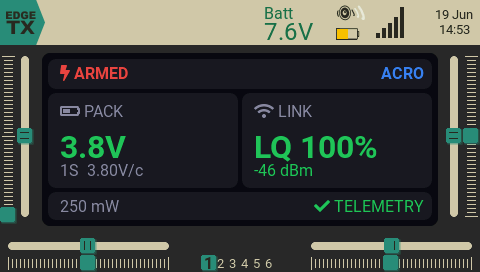
| FLY | Live dashboard with timer, mode, current, downlink LQ, link card, pack card, session strip, LQ history, telemetry state, and mute control. |
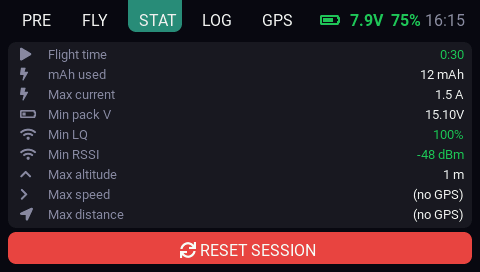
| STAT | Current pack summary with flight time, mAh, max current, min pack voltage, min LQ/RSSI, and GPS-derived maximums. |
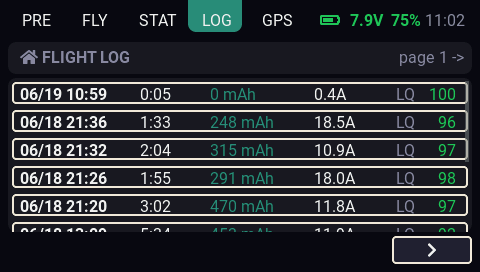
| LOG | Saved battery-session history with paged rows and detail views. |
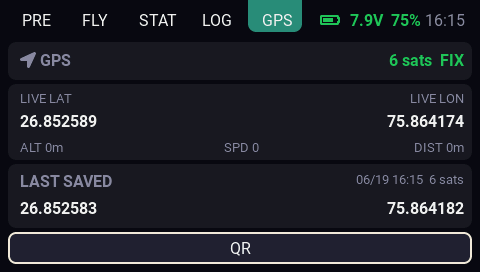
| GPS | Live coordinates, last saved coordinates, and QR sharing for the saved position. |
Main features
- Full-screen dashboard for EdgeTX 2.11+ color radios.
- Built first around the RadioMaster TX16S 480x272 screen.
- ExpressLRS / CRSF telemetry focused.
- Betaflight flight-mode sensor support for arm state and mode display.
- PRE, FLY, STAT, LOG, and GPS tabs.
- Compact mode for smaller EdgeTX widget zones.
- Color-coded link quality, RSSI, pack voltage, TX battery, and alert state.
- Configurable warning and critical thresholds.
- Haptic and sound alerts.
- Optional voice callouts for link quality and pack voltage.
- MUTE control for quieting alerts during a flight.
- 60-second link-quality history on the FLY screen.
- Per-pack session logging to the SD card.
- GPS coordinate display with live and last-saved positions.
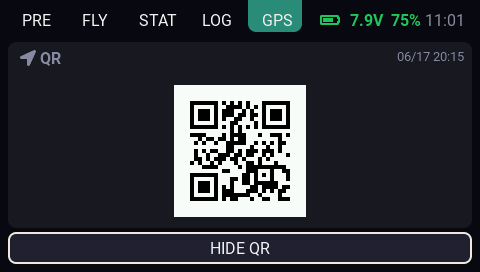
- Offline QR code for the last saved GPS position.
- Touch controls for tabs, mute, reset, log navigation, and QR view.
- Rotary support for browsing and opening log entries.
- Optional AutoTab behavior for key moments such as arm, connect, and link loss.
Pre-flight and live flying
The PRE screen is about fast confidence. It shows whether the craft is armed, what mode is reported, whether pack voltage looks reasonable, whether the link is healthy, and whether GPS is present.
The FLY screen keeps the live essentials grouped: link quality, RSSI, packet/rate information, pack voltage, current, mAh, telemetry state, and recent LQ history.
Session review
EdgeDeck treats each battery as a session. After a pack, the STAT and LOG screens make it easier to compare what happened without opening files on a computer.
Saved and displayed session values include:
- Flight duration.
- mAh used.
- Maximum current.
- Minimum pack voltage.
- Minimum LQ and RSSI.
- Maximum altitude, speed, and distance when GPS telemetry is available.
- Maximum TX power.
- Packet rate.
- First-arm GPS position when available.
This is meant for post-pack review: signal lows, packet rate, TX power, battery sag, current draw, and GPS-derived stats all help explain how a location behaved.
GPS and recovery
The GPS screen shows live coordinates and the last saved position. EdgeDeck saves valid coordinates periodically while GPS telemetry is available, then can show a QR code for the last saved point.
The QR code is generated on the radio by the widget. It does not need a network service.
Configuration surface
EdgeDeck keeps pilot-facing tuning inside normal EdgeTX widget settings. The options cover accent color, link thresholds, RSSI thresholds, per-cell voltage thresholds, audio behavior, and AutoTab.
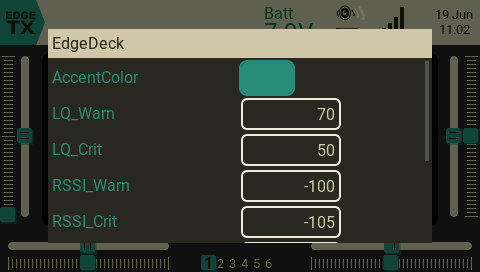
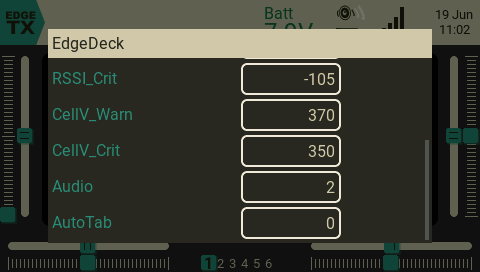
For exact install steps, sensor discovery, option defaults, and troubleshooting, use the EdgeDeck docs.
Requirements
- EdgeTX 2.11 or newer.
- A color-screen RadioMaster TX16S-style radio.
- ExpressLRS transmitter module and receiver with telemetry enabled.
- Betaflight sending CRSF telemetry.
- Sensors discovered on the radio.